


Have you ever thought of an important story that might be interesting to your fans and followers? If yes, you must have found an excellent video editing tool to create a short and sweet video. As I know, making a video is not the easiest thing to do. Adding special effects, uploading to social media, and other plug-ins are tedious tasks. However, the TunesKit AceMovi Video Editor can help you make storytelling easier in a comprehensive way.
TunesKit AceMovi Video Editor is a great video maker on the market and is considered one of the best video editors because of its ease of use, numerous features, and breathtaking effects. So, what is TunesKit AceMovi? How to use it and what’s its pros and cons? In the following part, I’ll give you a complete review about this professional video editing software.
What Is TunesKit AceMovi?
You don’t want to take an ordinary video, so you can create a unique one by adding special effects. TunesKit AceMovi Video Editor is an easy-to-use and intuitive video editing software for beginners and professionals. For YouTube users, it is the best choice for video editing.
It offers you various powerful functions, e.g., filters, transition, titles, and more, to enrich your video. The built-in stock library has rich videos, pictures, and audio for your editing needs. You can easily make your movies without any limits. TunesKit AceMovi Video Editor turns your videos into stunning movies.
With it, you can merge photos, videos, music, and text into the new movie. It can be applied to create commercial, industrial, and business videos, which can help you publish the story on YouTube and other platforms with ease.
Features of TunesKit AceMovi
Whether you’re an expert or a novice, you’ll be able to grasp all the possibilities of this video editor quickly.
You’re also allowed to edit programmatically with AceMovi Video Editor by using many built-in video templates, so you don’t need to write complex code lines.
Here are some key features of TunesKit AceMovi:
Searching for the right video editing software can be a challenging process. There are many different products available, and each one has its own unique set of features. To narrow down your list of choices, here are some things that you will find ideal TunesKit AceMovi video editor:
- Ease of Use
The best software should be easy to use so that even those without any experience will get started quickly and easily. TunesKit AceMovi is one of them; you will enjoy the experience because it’s super easy to install and use.
- Price
A good video editor should be affordable so that it is within reach of most consumers, says PCMag. It comes with different plans that you can buy according to your preferences. You can buy its premium version without leaving any watermark on your work. If you just want to have a try, you can of course download its free trial version.
- You can purchase your favorite video editor for just $19.95 each month.
- The one-year plan will cost you $39.95 yearly.
- Additionally, the lifetime plan is accessible for $59.95. One-time purchase, and then enjoy lifelong free upgrades and technical support.
- Compatibility
TunesKit AceMovi is compatible with both Windows and Mac computers, including both latest Windows 11 systems and macOS 11 Big Sur. As a lightweight video editor, it also consumes less RAM and keeps a stable performance.
- Audio tracks
In AceMovi, you have the option to use up to three audio tracks in your video, which means that you can mix and match music from different sources! This is useful because it means that you don’t have to rely on one piece of music for the entire duration of your film.
You could even use one song for a specific section of the video and then switch it up for another part if you wanted to!
- Split-screen effects
This feature allows you to split your video into two or four separate clips and choose how much each clip plays over the others. By doing this, it’s possible to create some cool transitions in your videos.
TunesKit AceMovi allows you to use this feature without fear of false creativity because its main aim is to provide you with creative video content.
- User Reviews
Before purchasing an editing program, take the time to read reviews given by other users who have already tried out the product. This will give you valuable information about what they liked and disliked about the software. TunesKit AceMovi has multiple customer reviews that will help you choose it as a professional tool.
How to Use TunesKit AceMovi Video Editor?
Most video editing software will take you lots of time to learn how to use it, but it is not for TunesKit AceMovi. This tool is simply designed with easy-to-navigate button on the interface. Everyone can easily handle it within a few minutes. Now let’s see how to use it to edit a video like a pro!
Step 1: Download and install the TunesKit AceMovi software. It only takes you a few seconds to complete this process.

Step 2: Add the media files you want to the program, including video files, audio files or images, etc. You can also use its inbuilt stocks in TunesKit AceMovi.
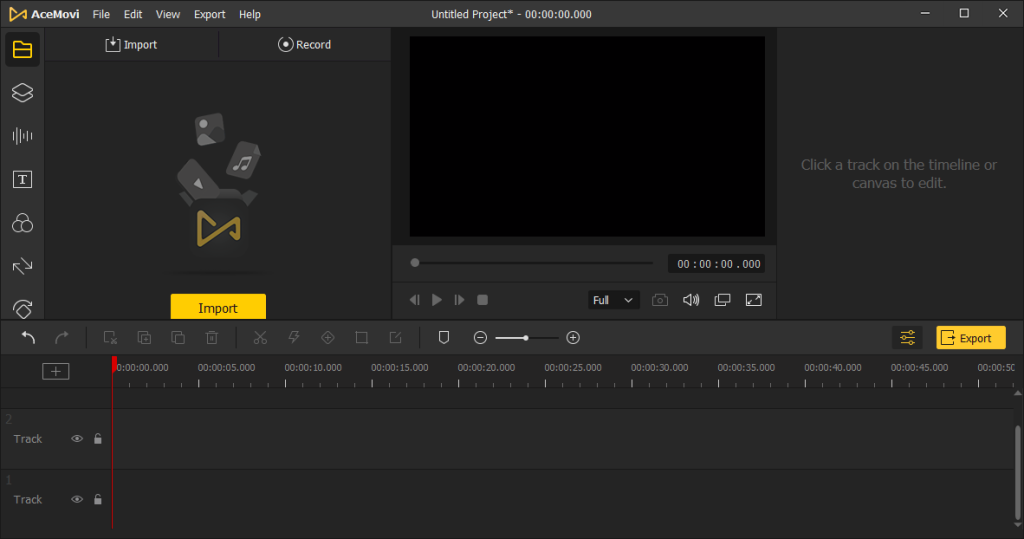
Step 3: After that, drag the target media files onto the timeline and start to edit the video, including cropping, splitting, cutting, zooming, adding special effects, background music, or text, etc.

Step 4: Finally, export your video and save it in MP4 or other formats onto your local computer. You can also upload it to YouTube, Facebook, Vimeo, and other platforms as you like.

Pros and Cons of TunesKit AceMovi
Now let’s see the simple advantages and disadvantages of TunesKit AceMovi Video Editor.
Pros:
- Basic video editing.
- A wealth of advanced editing.
- Flexible customizations.
- Free resources.
- Easy-to-use.
Cons:
- Sometimes, multiple layers of editing may be confusing.
Bottom Line
Considering its affordable price and powerful features, TunesKit AceMovi is an excellent video editor for beginners and professionals. The easy drag-and-drop interface means that you can turn your HD videos into smooth and stunning masterpieces even without much technical knowledge.
Adjust the video filters, add photos, music, and text to your liking, and watch your masterpiece come to life!
How have you found the review blog? Let us know in the comment section below.